
Hi-Res – SWF performance stats with style
Ricardo Cabello released a really nifty stats tracker the other day. Just download the Stats.as file from his Google Code site, create the following folder structure: net / hires / utils and place the Stats.as file into that. Once done you can import the package into your own code and make use of it.
The end result? A beautiful little real-time performance display that looks like this:
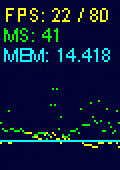
The FPS gives you a current and maximum frame rate count (the maximum is derived from the stage frame rate setting). The MS is a micro-second counter. MEM is the total memory (in MB) your SWF is using.
The cute little graph below that is a historical visualisation of these three things, so you can watch for spikes / peaks during activity. You can click the top/bottom of the stats to increase/decrease the stage framerate.
Using it is as simple as adding one line of code:
All I’d say is remember to make sure this happens on the TOP of all of the rest of your display list items.
Link: Hi-Res Stats Google Code page
Posted on August 14th 2008 at 9:55 am by Rich.
View more posts in ActionScript3. Follow responses via the RSS 2.0 feed.
Make yourself heard
Hire Us
All about Photon Storm and our
HTML5 game development services

Recent Posts


OurGames
Filter our Content
- ActionScript3
- Art
- Cool Links
- Demoscene
- Flash Game Dev Tips
- Game Development
- Gaming
- Geek Shopping
- HTML5
- In the Media
- Phaser
- Phaser 3
- Projects
Brain Food
